DJ Software

Sort your music at the speed of thought
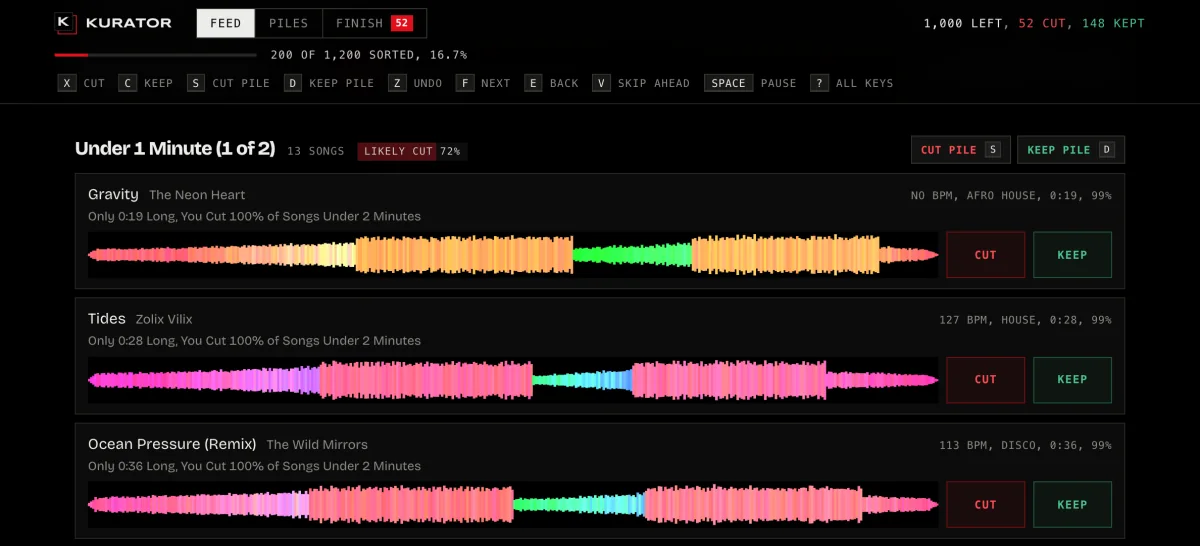
Kurator is a lightweight native Mac and Windows app that sorts a large messy music folder at the speed of thought. Point it at the folder where your music lives. It lays every song out in a feed of waveforms, grouped into piles, plays each one at highlight moments, and you press X to cut or C to keep. It learns from your answers and moves the songs you're most likely to cut to the top. It never goes online.
How It Helps
Kurator is purposefully designed for complete privacy. It can't go online. It can't collect or share your data. It doesn't require you to register. It's built to be simple, lightweight, and local to your device. Deleting is as easy as installing.
Hear What Matters
Every song starts with its highlights so you hear what drives it in a second instead of a long intro. Moving around the song is easy with keys so you can hear any part of it quickly. 3 band waveforms show you the shape before the sound arrives.
Clean Out the Noise First
Press X to cut and C to keep. Kurator learns from your answers and puts the likely cuts first, so the folder gets cleaner with every key press. Whole piles by artist, style, or tempo can go in one key.
You're in Control
Cut songs go to the Trash on Mac or the Recycle Bin on Windows, and only when you click Move Cut Songs to Trash and Confirm. Put any of them back from there at any time. Kurator never changes, moves, or renames a music file on its own.
First Open
A few steps the first time, then it opens like any other app
On Mac
Open the disk image and drag Kurator onto Applications.
Open Kurator. macOS says it can't check the app for malware. That's expected outside of the App Store. You can safely close that message.
Go to System Settings, Privacy & Security, scroll down, and click Open Anyway next to Kurator. On macOS 12 it's System Preferences, Security & Privacy, General.
Confirm, and Kurator opens. Click Choose Music Folder and start sorting.
On Windows
Right-click the download, choose Extract All, and keep the folder it makes.
Open Kurator in that folder. Windows says it protected your PC. That's expected outside of the Microsoft Store. Click More Info, then Run Anyway.
Kurator opens. Click Choose Music Folder and start sorting.
The extra steps exist because Kurator is independently made and intentionally not published on the App Store or the Microsoft Store. The Mac app is a few MB and uses only the frameworks already on your Mac. The Windows app carries its own runtime, so its download is bigger, and it draws its window with the WebView2 runtime that Windows 11 and most Windows 10 PCs already have. Neither one ever connects to the internet.
Keyboard Keys
Kurator is built for sorting speed. You can put both hands on the keyboard to make quick decisions without lifting a finger. You can still use the cursor.
Your Music Is Safely Yours
Kurator never changes, moves, renames, or deletes a music file without your confirmation. Cut songs go to the Trash on Mac or the Recycle Bin on Windows, and only when you click Move Cut Songs to Trash and Confirm, so you can put any of them back from there at any time.
It keeps its settings, your answers, and the waveform cache in its own folder under Application Support on Mac or Local AppData on Windows. Delete that folder to start over. Your music isn't touched.
It never goes online or sends anything anywhere. There are no analytics. The only link out is the credit below, which opens this site.
Questions & Feedback
Share any questions or ideas, and our team will try our best to help
Thank you, our team will be in touch by email